Running a VAT Invoice Check
Roll a period's compliance verdicts into one dashboard: the VAT split between clean and flagged invoices, registration coverage, and an audit pack CSV.
Last updated 9 October 2026 · 3 min read
What it does
The VAT Invoice Check screen rolls every stored compliance verdict up to a VAT period: how much VAT sits on invoices with no defects found, how much sits on invoices with defects to review, and exactly which documents those are. Completed extractions feed it automatically: run the period before your return and the defects surface before HMRC sees them. Included on Silver plans and above.
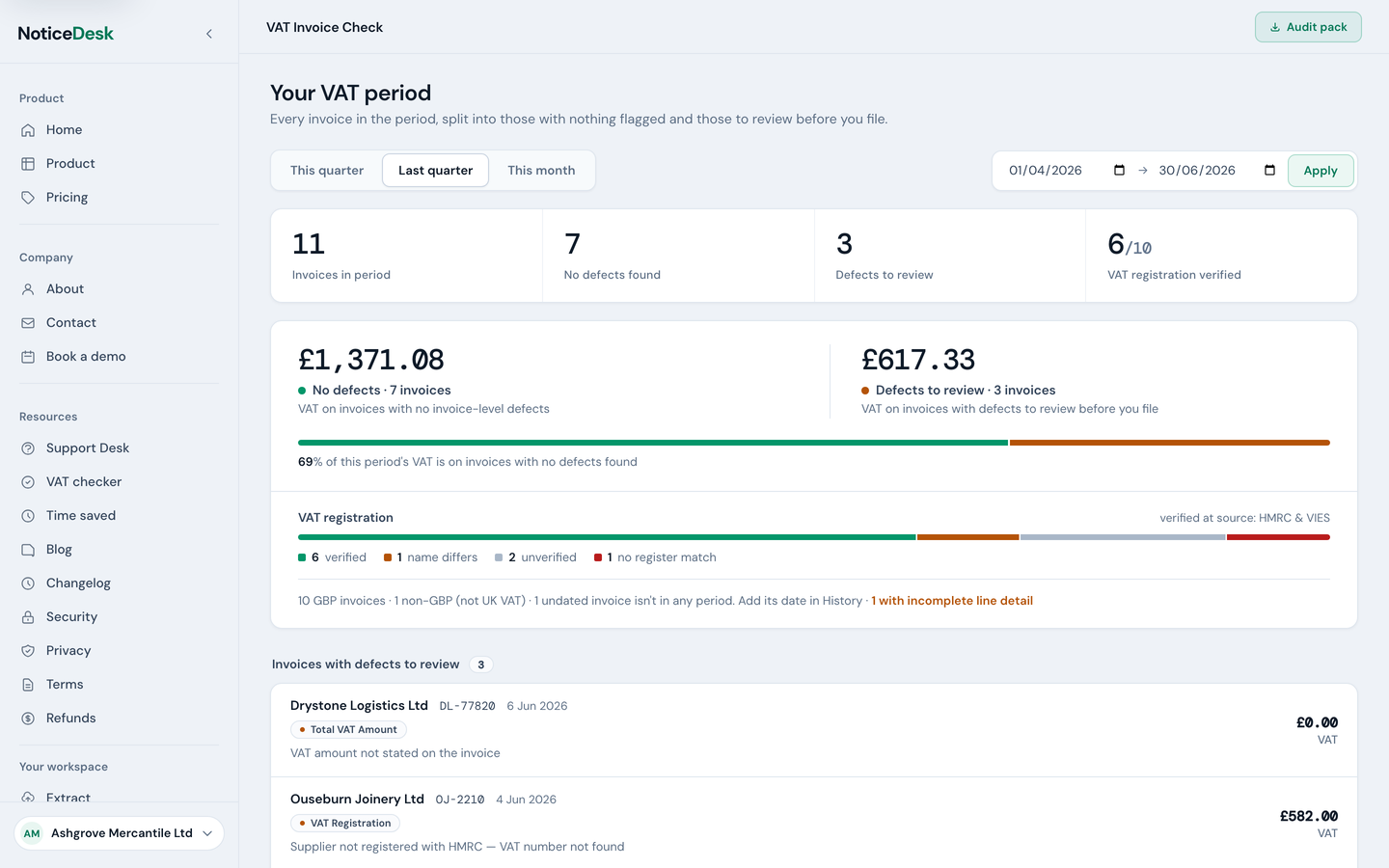
Pick the period
Preset tabs cover This quarter, Last quarter and This month, or set a custom from/to range. It defaults to the current calendar quarter. Invoices are placed by their invoice date: a document with no date can't be placed in any period, and the screen tells you so (open it from History and add the date).
Reading the dashboard
- The two headlines: VAT on invoices with no invoice-level defects, and VAT on invoices with defects to review before you file. The bar under them shows the split, with the percentage written beneath it.
- VAT registration is reported on its own. An invoice can be perfectly formed while its supplier's VAT number was never verified (no lookup available, non-UK, network); the coverage bar shows verified / name differs / unverified / no register match. An unverified lookup is never counted as verified, even when the invoice itself is clean.
- Credit notes reduce the period. A credit note's VAT is subtracted, and an explicit line states it: "Includes 2 credit notes reducing period VAT by £64.20."
- Receipts count like invoices. A receipt is a positive supply and its VAT joins the same pools. A receipt that shows only a gross total contributes no VAT figure and is not flagged for it.
- Invoices or documents. The count card at the top reads "Documents in period" when the period holds a receipt, a credit note or a document in another currency, and "Invoices in period" otherwise. The headlines, the lists and the bar count GBP documents only, so they say "documents" when those include a receipt or a credit note, and "invoices" when they do not.
- The quiet caveat line counts what's in and out of scope: non-GBP documents (not UK VAT), undated documents, and any with incomplete line detail. A period that holds documents only in other currencies says so, and that there is no UK VAT to check.
- Possible duplicates are left out. A document History flags with the ⚠ Duplicate pill is not added to either headline, the lists or the audit pack, so one supply cannot be counted twice; a line states how many GBP documents were left out, the ones the totals would otherwise have counted: "2 possible duplicates left out of the totals (see History)." The audit pack's caveat line counts every duplicate the pack leaves out, in any currency. If the flag is a false alarm because a number or supplier was misread, correct the record and save and the flag clears; two genuine documents that happen to match are for Not a duplicate in the AI Companion, which puts the document back in the period; a true copy is for an owner to delete. A document is only ever left out while the earlier record it was matched to is still in your history. See duplicates.
Working the flagged list
Flagged invoices come first, each with chips naming its defects and the messages beneath. Click an invoice's row to open the stored document read-only, so you can see exactly what the check saw; if it's a fixable extraction error, correct it from History and re-run the period. The clean list sits in a collapsible section below, open by default when nothing's flagged.
The audit pack
Audit pack (top right of the VAT Invoice Check screen) exports the period as a CSV: one row per dated invoice with supplier, VAT number, amounts, document type, the check result (Clean / Flagged / Other currency) and the specific issues. The on-screen lists show the first 200 rows of a big period; the counts and the audit pack always cover everything.
Worked-out VAT
Where NoticeDesk works a document's VAT out from printed figures (see Worked-out figures), the period counts it only once someone has accepted it. The VAT line then says how much of the period's VAT was worked out, and on how many documents. A document whose worked-out VAT nobody has accepted is not counted: the screen lists those documents under the totals, and opening one lets you accept or reject the figure. The audit pack gains a VAT Source column saying where each row's VAT came from: printed on the document, worked out and accepted, entered by a person, or read under rules that could fill in figures the document does not print.
These are automated invoice-level checks against HMRC Notice 700. Results depend on extraction accuracy and registration-lookup availability, and they don't assess business purpose, blocked input tax or partial exemption; verify before you file. The same caveat is printed on the screen and in the audit pack.