Worked-out figures
NoticeDesk copies what your document prints. Where a figure is missing but follows exactly from printed ones, it shows the working beside the blank, and nothing goes in until you accept it.
Last updated 9 October 2026 · 12 min read
What NoticeDesk reads, and what it works out
NoticeDesk copies what your document prints, and nothing else. A figure the document does not show is left blank rather than filled in: the net on a till receipt that prints only its total, the unit price on a line that shows only an amount, a back-order on an invoice that lists ordered and shipped quantities. A blank on a new record means the document does not print that figure.
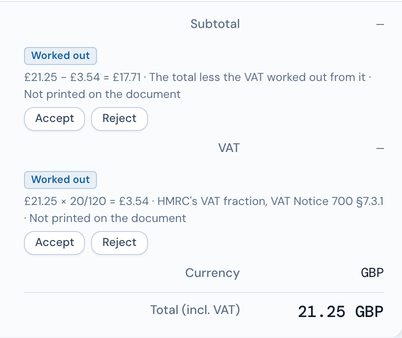
Some of those blanks can be worked out exactly from figures the document does print, by an HMRC rule or by plain arithmetic. NoticeDesk's own code does that arithmetic, and shows the result beside the blank, labelled Worked out, with the working and what it rests on. Nothing goes into the record until you accept it.
On a receipt the net is worked out from the VAT, so accepting the net accepts the VAT with it. The note under the net says so while the VAT is still waiting.
The figures NoticeDesk works out
| When the document shows | NoticeDesk works out | Basis |
|---|---|---|
| A receipt with a total and the same VAT rate on every priced line, but no VAT amount and no net | The VAT: the total × rate ÷ (100 + rate), to the nearest penny. £21.25 at 20% is £3.54 | HMRC's VAT fraction, VAT Notice 700 §7.3.1 |
| The same receipt | The net: the total less that VAT. £17.71 | Arithmetic |
| An invoice or credit-note line with an amount and a quantity, but no unit price | The unit price: the amount ÷ the quantity, when it divides exactly to four decimal places. £900 ÷ 3 is £300.00 | Arithmetic |
| A net and a total, but no VAT amount | The VAT: the total less the net. £120 less £100 is £20.00 | Arithmetic |
| A VAT amount and a total, but no net | The net: the total less the VAT | Arithmetic |
| Ordered and shipped quantities, but no back-order | The back-order: ordered less shipped | Arithmetic |
A figure is worked out only from figures the document prints, and only where the document shows nothing for it. The list is closed: NoticeDesk never works out a VAT rate the document does not print, a due date from payment terms, a delivery address or a country. Those are yours to enter if you need them.
On a receipt over £250 the VAT is still offered, and it says why it needs a second look: HMRC expects a full VAT invoice above £250 (§16.6.2), and without one the claim is at HMRC's discretion (§19.5.5). Ask the retailer for a full VAT invoice.
Accepting, changing or rejecting a figure
While figures are waiting, a bar above the record counts them: “3 figures worked out by NoticeDesk, not printed on the document.” Accept all accepts every one; Review takes you to them. Each figure has its own buttons too:
- Accept puts the figure in the field. A quiet Worked out mark stays on it, naming who accepted it.
- Reject leaves the field blank. NoticeDesk offers the figure again only if a figure it was worked out from changes.
- Typing your own figure replaces the proposal. It is your figure from then on, and it is still not printed on the document.
Accepting and rejecting are ordinary edits: Undo reverses them, and Save keeps them. If you later change a figure a working rests on, such as the total, an accepted figure keeps its value and says it was worked out from an earlier figure, with a button to accept the new working instead. And while you have typed over a printed figure a working needs, the working waits, and its cell says what would settle it: a re-read of that figure, or marking your figure as printed.
What the compliance checks judge
The checks judge what the document prints. An accepted figure fills the record and goes into your exports, but it never makes a missing particular look printed. An invoice that shows no VAT amount still fails Total VAT Amount after you accept the worked-out VAT, because HMRC asks the invoice itself to show it.
The same goes for a figure you type over one the document prints. Until NoticeDesk can see your figure on the document, the row says so: “The read found £20.00; you entered £25.00. Re-read it, or mark it as printed, to have the checks use your figure.” There are two ways to settle it:
- Re-read it (✦). NoticeDesk reads that figure from the document again, without being told what you typed. If the document shows your figure, the checks use it.
- Mark as printed. You confirm the document prints your figure. Your name and the date go on the record and into the evidence pack, and the mark holds for as long as the field keeps that figure. With the document open, NoticeDesk re-reads it first, and a re-read that finds your figure needs no mark. If the re-read cannot run, for example because the workspace has reached its daily re-read limit, you confirm the mark yourself.
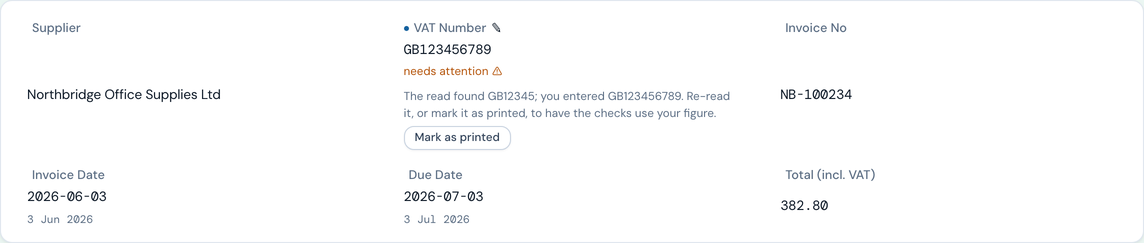
Mark as printed appears only on the particulars a VAT invoice must show, and only on a figure you entered. It never appears on a worked-out figure. A mark can be taken back with Remove mark.
A figure a re-read found carries Remove re-read. A re-read can be wrong in the ways listed under Re-reading a line; removing what it found hands the checks what the read found again, or nothing where the read left the field blank.
When a re-read cannot find a figure on the document and you choose Clear the field, NoticeDesk records that the document does not show it. The checks then treat that particular as not printed, rather than judging the value the read had put there, and the note says a re-read found none. If you type a figure there before saving, the finding is dropped and the checks judge the field as they would any figure typed over the read, on screen and when you save. Once the record is saved with the finding, a figure typed there later is still treated as not printed until you remove the re-read or mark your figure as printed. A later re-read that finds the figure on the document ends the finding: the checks then judge the field as they would any other, and the record's history says the finding was superseded by that later re-read, not removed by whoever saved. If the invoice number was left blank on the strength of the finding, Save then says a later re-read found an invoice number on the document, so type it in or re-read the field. Remove re-read takes the finding back, here or in the History strip. The one exception is an invoice number the re-read found none of and you cleared: a saved record keeps an invoice number unless the document shows none, so to remove that finding, type the invoice number first.
A line the read missed
The Extract screen has no control for adding a line, so a line the document prints and the read did not pick up cannot be typed in. It stays missing from the record, and Line Items Sum shows the difference it leaves between the lines and the subtotal. A line can still reach the record without the read behind it, for example one you removed and then brought back with Undo after saving. NoticeDesk no longer knows it as a line the read found, so its figures count as entered by you and the checks count the line's particulars as missing. After you save, such a line carries Mark this line as printed: one confirmation marks each required figure on it, with your name and the date, exactly like Mark as printed on a single field. A re-read never matches such a line, so marking it is the only way the checks can use its figures.
In History
A saved record with figures waiting carries a Figures waiting marker in the History list. Open it and the same choices sit in a strip above the record: Accept all, Accept, Reject, Mark as printed, Mark this line as printed and Remove re-read. You don't need the document open, so an emailed-in receipt's VAT can be accepted straight from History. Owners, admins and members see the strip; viewers see the figures and the marker, without the buttons.

In your exports
Exports use the figures on the record. A worked-out figure still waiting is blank there, so a waiting VAT posts as no VAT at all. The export dialog says so before the file is made, and says what to do about it: “No VAT amount was read from this invoice. Accept the worked-out £20.00, re-read the VAT on the record, or it posts with no VAT.” An invoice that prints a VAT rate but no VAT amount gets its own sentence, and is never steered towards a zero-rate code.
In the evidence pack and the audit pack
The evidence pack's extracted fields carry a Source for every value on a new record:
| Source | What it means |
|---|---|
| Read from the document | The read found it, and it has not changed |
| Read by a re-read on date | A re-read found it on the document |
| Marked as printed by name on date | A person confirmed the document prints it, with what the read found where it found something different |
| Worked out by NoticeDesk | The working, its basis, and who accepted it; or “not accepted: blank in exports” |
| Entered by a person | Typed in, with what the read found, or “not printed” where it found nothing |
| Classified by NoticeDesk from the document | The document type: invoice, credit note or receipt |
| As recorded; a document with no currency is taken as GBP | The currency, as the record holds it |
On the VAT Invoice Check, the period's VAT counts accepted worked-out VAT and says how much of it was worked out, names the invoices whose VAT is still waiting (not counted until accepted), and the audit pack gains a VAT source column.
Records read under the older rules
Every record read before worked-out figures arrived was read under older rules, which could fill in a figure the document does not print. Its figures are shown and checked exactly as before, no working is offered on it, and its evidence pack says it was read under rules that could fill in figures the document does not print. A blank on one of those records doesn't tell you what the document shows.
Re-reading a line
On a new record, a ✦ re-read of anything on a line, whether one figure, a whole column or the line totals behind Line Items Sum, reads the document's line table again without being told what the record holds. It finds each line by what it prints: its product code or description, and its other figures. So a figure lands on the line it belongs to, even after you have removed lines. A re-read of one line works straight away. A re-read of a whole column, or of the line totals, asks you to save first when you have added or removed lines since the last save.
When NoticeDesk cannot pick out exactly one printed line for a row, it changes nothing and says why:
- More than one line matches. The document prints the same line more than once, such as two identical delivery charges. The message lists them. Edit the field directly. On a particular the document must show (a line's description, net amount and VAT rate, and on an invoice its unit price and quantity too), you can then mark what you typed as printed; the message says so when you can.
- No line matches. One of the row's figures, or its description or code, differs from the document's, often because the read misread it. Re-read the figure that differs first; the others then find their line.
- The same printed line matches two lines on this record. Often one of them is a copy the read made. Remove the copy, save, then re-read.
- The matching line is missing a figure. One printed line looks like this row, but the re-read did not show every figure the row has, so NoticeDesk cannot be sure it is the same line. Try again, or edit the field directly.
- The value may belong to another line. The re-read found the line, but cannot be sure the value beside it is this line's own: a column of the table may have slipped by a row. Edit the field directly, and on a particular the document must show, mark what you typed as printed.
- A figure the read left blank. When the line also shows its other two figures (a quantity and an amount, say), a re-read does not fill the blank: a figure the document prints and one worked out from the others look exactly the same. A unit price is offered as a worked-out figure; if the document does print the figure, type it in. You can then mark it as printed, except a unit price or quantity on a receipt, which a receipt need not show.
- The figure could not be used. The matching line prints it in a form NoticeDesk does not read as a figure, such as
(12.00), or with more decimal places than the record keeps. Edit the field directly. - Too many lines to check. A document with more lines than one re-read can check changes nothing. Edit the field directly.
What a re-read cannot tell apart, so check what it changes (while you are editing, Undo takes a change back):
- Two printed lines that look the same. When the read made a line look exactly like another line the document prints (the same description, code and figures), a re-read can give it that other line's value.
- A discounted line. On a line whose amount is not its quantity times its price, a re-read can take a figure from the line beside it that does fit.
- A figure the read made up. When the read filled in a figure the document does not print, and the document's other figures work out to the same value, a re-read confirms it. A re-read cannot tell a figure the read invented from one worked out from the others.
When one of these has given a field a wrong value, Remove re-read takes it back.
A line NoticeDesk cannot match to the read, such as one brought back after a save, is never matched by a re-read either. A re-read of a whole column says how many lines it left as they were, and why: lines it could not match, lines it found but whose value it cannot be sure of, and lines not matched to the read.
A record read under the older rules still finds a line by its place on the record, so on one of those, re-read the lines below a line before you remove it.