Getting invoices approved
Ask a teammate to sign off an invoice. Decisions carry a written reason and stay on the invoice's timeline.
Last updated 9 October 2026 · 4 min read
What it is
The approval workflow is a second pair of eyes for teams: before an invoice goes anywhere near your accounts package, someone other than the person who prepared it signs it off. It's opt-in per invoice (request approval on the documents that warrant it, skip it on the ones that don't) and it's advisory: nothing is ever locked or blocked. NoticeDesk reminds you of the approval state at the moments it matters (like exporting) and leaves the decision with you.
If your plan changes while approvals are in use, nothing you've already recorded is lost. Existing approvals, rejections and their reasons stay readable on the invoice, in its timeline and in its Evidence record. A request that was still pending stays on the invoice: you'll see who it's with, and it can be decided again once approvals are back in your plan. Cancel request keeps working on those plans too, so a pending request is never something you're stuck with.

Request approval
-
Open the invoice in History
Approvals live on the stored record, so the numbers being approved are the numbers that were saved, not whatever happens to be on an Extract screen.
-
Press Request approval and choose who
Pick a teammate from Choose approver…. Your own name appears greyed out and marked (you); so does whoever is currently accountable for these numbers, marked (requester). The rule behind both: nobody approves numbers they're accountable for, and the server enforces it even if a browser tried to work around it.
-
They get told
The approver receives an email, and the History entry in their sidebar carries a badge until they've dealt with it. The invoice's row shows an Awaiting approval pill meanwhile.
Change your mind? Cancel request withdraws a pending request and the invoice returns to having no active approval. Note that it doesn't erase who was accountable, so cancelling and asking again can't be used to hand yourself the approval.
A request is also withdrawn for you if the person it's waiting on leaves the workspace or becomes a viewer (viewers can't decide approvals). The invoice's timeline records that the assigned approver left, the Awaiting approval pill clears, and the person who asked can press Request approval again to choose someone else. Nothing about who was accountable changes.
Approve or reject
When something needs your attention the History entry carries a badge. Clicking it takes you to History filtered to Awaiting approval (the workspace's whole queue, so yours may sit among a colleague's), or to Rejected if the badge is there for a rejection of yours. Open the invoice, read it exactly as it was saved (fields, compliance verdict, timeline) and either:
- Approve: the strip then records who approved it and when, and the requester gets an email (unless they have left the workspace since asking; the decision stays on the record either way).
- Reject: a reason box appears, and a written reason is required. "Wrong VAT amount, check line 3" gives the requester something to fix; a bare rejection doesn't. Confirm with Confirm rejection, and the reason travels with the record, and with the email unless the requester has left the workspace since asking.
After a rejection
The person accountable sees a badge on History until they've opened the rejected invoice: opening it is what marks the rejection as seen, so the badge clears itself once you've actually read the reason, not before. Fix what was wrong (edit and save the extraction), then press Request approval again.
If the invoice was rejected for a reason you accept and there's nothing to re-submit, Clear this rejection closes it off: the rejection and its reason stay on the timeline and in the evidence pack, the invoice stops waiting on anybody. It also clears the badge. As with cancelling a request, it doesn't erase who was accountable.
What a later edit does to an approval
An approval covers the numbers as they stood when it was given. If anyone materially edits the invoice afterwards (changing the extracted values, not just re-saving), the sign-off no longer describes what's on the record, so an Approved invoice goes back to Awaiting approval with the same approver asked to look again.
At the same time the person who made the edit becomes the one accountable for the new numbers, and they can't approve them, so the sign-off still needs a second pair of eyes.
There's one case where the invoice comes back needing an approver rather than the same one: when the approver themselves made the edit. They're now the person accountable for the new numbers, so they can't also be the one who signs them off. The strip says the invoice needs an approver and offers Choose an approver so you can name a colleague. Nothing is lost; it just takes one extra click to keep the second pair of eyes real.
Finding things by approval state
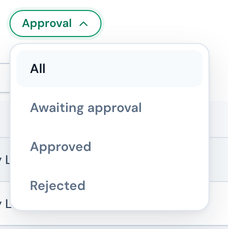
History's Approval ▾ filter shows All, Awaiting approval, Approved or Rejected; combine it with search, dates and the other filters as usual. And when you export an invoice from History that's Awaiting approval or was rejected, the pre-export check mentions it before the download: advisory, never blocking. An invoice nobody sent for approval exports without comment: approval is opt-in, so there's no request outstanding to remind you about.
Every request, decision, reason and reset is recorded on the invoice's timeline alongside its edits and exports.