Receipts and simplified VAT invoices
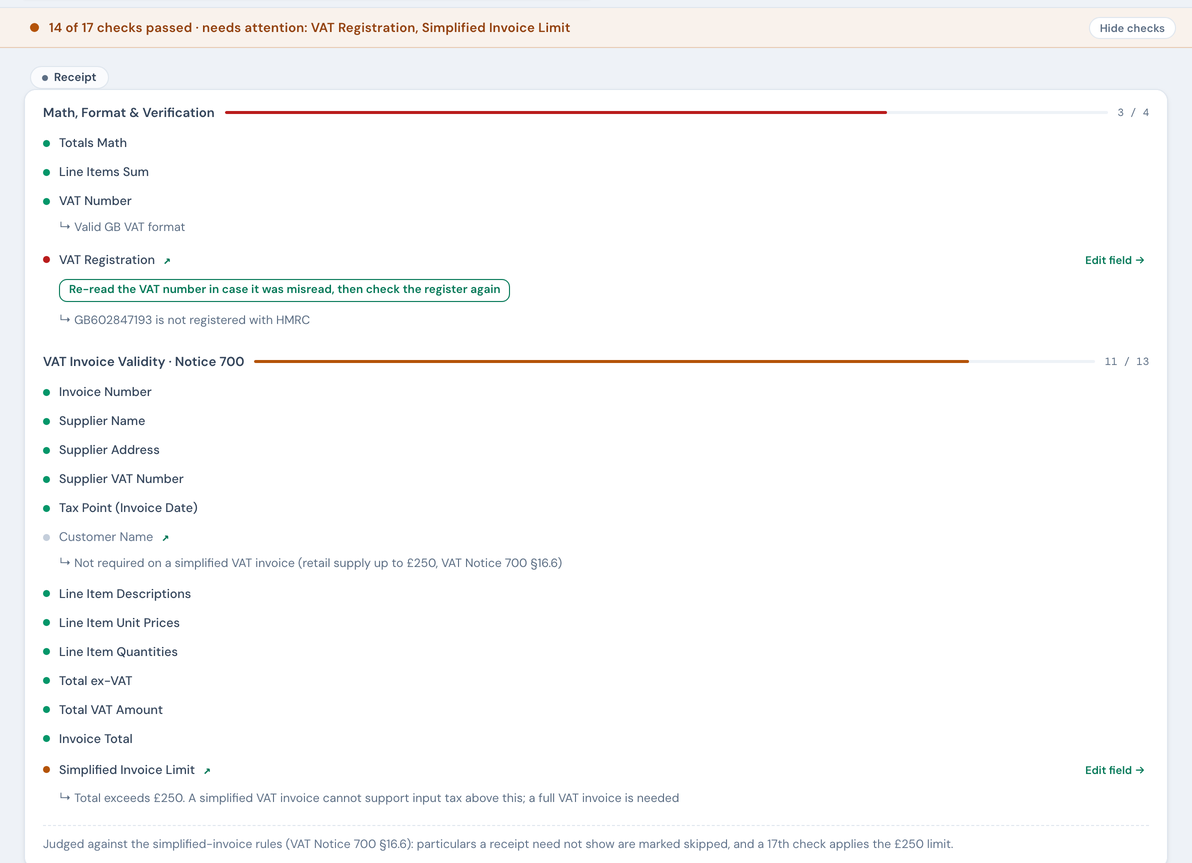
A till receipt is not a full VAT invoice and is not checked as one. NoticeDesk judges it against the simplified-invoice rules (VAT Notice 700 §16.6), so the particulars it lawfully omits show as skipped, not failed, and the £250 limit gets its own check.
Last updated 9 October 2026 · 12 min read
What counts as a receipt
A till receipt, a card-terminal slip or a point-of-sale printout from a shop, a garage, a café or a trade counter. NoticeDesk recognises one at extraction and marks it with a Receipt pill, the same way a credit note gets its own pill. The tell-tales are the ones you'd use yourself: no customer name or address, no unit price × quantity per line, and usually a VAT-inclusive total with a VAT rate or VAT number rather than a separate net figure. A total of £250 or less is a strong signal but not a rule.
A document headed Invoice or Tax Invoice that names you as the customer and itemises net lines is an invoice, however small the amount, and is checked as one. If a document is genuinely ambiguous, NoticeDesk treats it as an invoice: the full set of checks is the safer default.
Why a receipt is checked differently
HMRC's VAT guide allows a simplified VAT invoice for a retail supply of £250 or less including VAT (VAT Notice 700, section 16.6). It has to show the supplier's name, address and VAT number, the time of supply, a description of what was supplied, and, for each VAT rate, the amount payable including VAT and the rate. It does not have to show the customer's name, a per-line price and quantity, the ex-VAT subtotal or the VAT as a separate figure.
Checked as a full invoice, a perfectly lawful £12 fuel receipt would fail five checks it was never required to pass. That reads as noise, and noise is how the red rows that matter stop being read. So on a receipt those five checks skip when the document leaves the particular out, and pass exactly as they would on an invoice when it happens to include it.
What relaxes, and what never does
| Check | On a receipt |
|---|---|
| Supplier name, supplier address, supplier VAT number | Required, exactly as on an invoice |
| VAT number format and VAT registration | Run exactly as on an invoice: the number is looked up on the register |
| Tax point (invoice date) | Required |
| Line item descriptions | Required: a simplified invoice must still describe what was supplied. This is the one line-level check that stays strict, so a receipt whose lines didn't read at all fails here while the price and quantity rows go quiet |
| Invoice total (including VAT) | Required: it's the one figure a simplified invoice must carry |
| Invoice number | Required, worded as a receipt or transaction number. Notice 700 §16.6.1 does not list a number among a simplified invoice's particulars, but a document with no number at all is not an identifiable record, so the check keeps the stricter reading; till receipts carry a transaction number in practice |
| Customer name | Skipped when absent |
| Line item unit prices and quantities | Skipped when any line lacks them, or when the receipt has no line detail at all. Priced and counted on every line, and they pass as an invoice's would |
| Total ex-VAT and Total VAT amount | Skipped when absent |
| Totals Math and Line items sum | Skipped when there is no subtotal to reconcile against; run as normal when the receipt prints one (lines whose prices include VAT add up to the total instead, and pass) |
Each relaxed row says why, and cites the section of Notice 700 it relies on. A receipt with a missing supplier VAT number, no date or no description is flagged exactly as an invoice would be: those particulars are never optional.
On a sterling receipt of £250 or less, the relaxed rows are not gaps: the band counts them as “not required”, and a receipt whose every other check passes carries no warning pill in History. The Total VAT amount row counts that way only when a line shows its VAT rate, because a simplified invoice must show the rate, and Line items sum only when the lines add up to the total (lines that don’t, such as a “cash tendered” line read as an item, or a line total that can’t be read as a figure, make Line items sum warn, the caption beside Line items reading “do not sum to the total” or “a line total can’t be read”, and History flags the receipt until the lines match the total: remove or correct the stray line; a receipt saved by an earlier version of NoticeDesk shows that row as skipped and is flagged all the same; so is one it saved that prints no subtotal and is in another currency, or in sterling with a total that could not be read as a figure, whether or not its lines add up, since the saved copy does not say). Over £250, or in another currency, the other relaxed rows stay plainly skipped, since the simplified-invoice rules may not cover that receipt: they read “not run”, not flagged. A skipped row never puts a warning pill on the receipt in History; only a failed or warned check does, such as the £250 limit below.
The £250 limit
Receipts carry one check invoices don't: Simplified Invoice Limit. It compares the receipt's total with the £250 ceiling. At £250.00 or below the check passes quietly; above it the row warns, because a simplified VAT invoice cannot support input tax on a supply over £250 and a full VAT invoice is the document to ask the supplier for. It applies to positive sterling totals only: a receipt in another currency, or one whose total didn't extract as a number, records the check as skipped rather than compared. A receipt with no currency stated is taken as sterling.
It is one of only three warnings anywhere in the suite that count as a defect: an over-£250 receipt is listed among the period's documents to review on the VAT Invoice Check, and the reason appears in the audit pack. (The other two are a supplier VAT number under a country code we hold no format rule for, which reports as “could not be checked” on any document type, and a date that is printed but “could not be read as a date”; a document with an unreadable date sits in no VAT period, so it is counted as undated there rather than listed, but its evidence pack reads “Defects to review” and a batch counts it among the flagged.) Every other warning on a receipt stays advisory to that rollup. The reason for the exception is that this check has no fail state at all, so without it a large document typed as a receipt would reach an accountant reading as clean.

Where receipts appear
| Surface | How a receipt shows |
|---|---|
| Extract | The Receipt pill above the band; the standard header card and details cards (no original-invoice fields) |
| History | The same pill on the row (and no warning pill unless a check fails or warns, such as line totals that don’t add up to the total; a skipped row never adds one), a Receipts quick filter, and a one-line note on the detail view saying the simplified-invoice rules applied |
| VAT Invoice Check | Counted as a positive supply like an invoice; a period that holds receipts says "documents" rather than "invoices". A receipt showing only a gross total contributes no VAT figure and is not flagged for it |
| Finance-Ready CSV | Document Type reads "Receipt". Where the receipt prints VAT-inclusive lines and no net subtotal, Line Total is each line's net, as it is on an invoice, and the Subtotal cell carries their sum; the unit price stays as the receipt printed it. See Exporting a receipt |
| Ledger exports (Sage 50, Xero, QuickBooks® Online, the FreeAgent bill-ready sheet) | Exported as an ordinary purchase (Sage Type=PI; positive lines in the other three files). Where the receipt prints VAT-inclusive lines and no net subtotal, each line is netted down before it is written, so the file posts what you paid. See Exporting a receipt |
| Evidence record and audit pack | The document type row and column read "Receipt" |
Exporting a receipt
An invoice prints its lines net of VAT and states the VAT separately, and the ledger exports are built on that: each line's amount is the net, and the VAT is worked out beside it. A till receipt usually does the opposite. Its lines are the amounts you paid, VAT included, and it prints a total with the VAT inside it and no net subtotal at all. NoticeDesk records what the receipt prints, so the line amounts on a receipt like that are VAT-inclusive. Written into a ledger as they stand, they would post as net with the VAT added on top: a £23.10 receipt becoming a £26.95 bill.
So before a receipt reaches any export, NoticeDesk looks at what its line amounts are:
- The lines add up to the total. They are VAT-inclusive. Each line's VAT is taken out of it (its own printed rate where the receipt prints one per line, otherwise its share of the stated VAT), and the line is written at its net amount with that VAT beside it. Net plus VAT on every row is the figure the receipt printed, and the file totals what you paid. On the Xero file the line is written as one unit at its net amount, because a receipt's unit price, where it prints one, includes VAT too. A line the receipt prints with no amount at all (a card-payment line, say) counts as nothing when the lines are added up, and is written at zero in the ledger files.
- The lines add up to the total less the VAT. They are already net, and are written as they are.
- The lines carry no amounts at all (a fuel receipt that names what was bought and prints only a total). The receipt's money is written on one line, net of any VAT it states, keeping the line's description. Without this the receipt exported as a £0.00 bill.
- The lines add up to neither, or one of them is not an amount. A line may have been missed, a discount dropped, or a cell may read a word where a figure should be. NoticeDesk cannot tell what the amounts are, so it keeps the net reading and the export dialog says so: This receipt has no net subtotal, and its line amounts do not add up to its total, so the export treats the lines as net and works the VAT out on top. Check the lines before you download.
A receipt that prints a net subtotal is reconciled and exported exactly as an invoice would be, unless its lines add up to the total rather than to that subtotal: then its prices include VAT, and its lines are netted down as above. A receipt that prints a total but no VAT figure exports its lines net of nothing, with VAT of zero: what you paid still lands, and the VAT split is yours to key from the receipt.
The Finance-Ready CSV follows the same reading, so a combined file still adds up: its Line Total column is net on every row, invoice or receipt, and where the receipt printed no subtotal the Subtotal cell carries the summed net, so Subtotal plus Tax is the total on every row. The unit price and quantity columns stay as the receipt printed them (a receipt's unit price includes VAT too, and NoticeDesk does not invent a net one). This file downloads without a dialog, so a receipt whose lines add up to neither figure is written there as printed, with the Subtotal cell left blank: check its lines yourself.
What the results are, and aren't
These checks describe a document against published rules and show their evidence. A receipt that passes is not a determination of how HMRC will treat any claim, and the £250 check states the rule rather than deciding your input tax. Whether a particular purchase is recoverable at all depends on things no document can show, such as business purpose. Treat the result as a first pass that catches defects before your return does.
If the document type is wrong
The document type is decided once, at extraction, and is then pinned to the record. It is deliberately not editable: it steers which checks run and, for credit notes, the direction of money in your exports, so it is not a field a typed fix or a keystroke can move afterwards. There is no Document type box in the form, it is not one of the fields the AI Companion's fix box is allowed to change, and saving an edit rewrites it back to the stored value.
So a wrongly typed document cannot be corrected in place. The only way to reclassify one is to delete the record and upload the file again, and that has real costs worth knowing before you do it:
- Only a workspace owner can delete a record, using Delete record on the History detail view; the button isn't shown to anyone else. Deletion is a soft delete: the stored row and its audit trail survive, and the deletion itself lands on the timeline. What it does remove is the record from History and from your VAT-period totals.
- Delete first, then re-upload. Uploading the same document again while the original is still live gives you back the stored record unchanged, spending nothing but changing nothing either.
- The fresh upload costs a credit and runs a new extraction, so the classification is a fresh judgement rather than a correction; it may land the same way again.
Because of that, a re-upload is worth it mainly when the type changes the answer rather than just the label. The case that matters is an invoice read as a receipt, where the relaxed rules can let genuinely missing particulars pass unremarked; if the total is over £250 the limit check raises it for review anyway, so the ones to watch are below that. The reverse, a receipt read as an invoice, is the safer error: it is checked more strictly than it needs to be, and the extra red rows are exactly the particulars a simplified invoice is allowed to omit, so you can read them and move on without re-uploading anything.
Either way, please tell us at [email protected] and send the document if you can: classification is a judgement we tune, and the examples that get it wrong are the ones that improve it.