Understanding your compliance results
What NoticeDesk's compliance checks look for (16 on every document, plus a 17th on credit notes and on receipts, the latter judged against the simplified-invoice rules), what pass, warn, fail and skipped mean, and how to fix a flagged invoice.
Last updated 9 October 2026 · 11 min read
What the card is
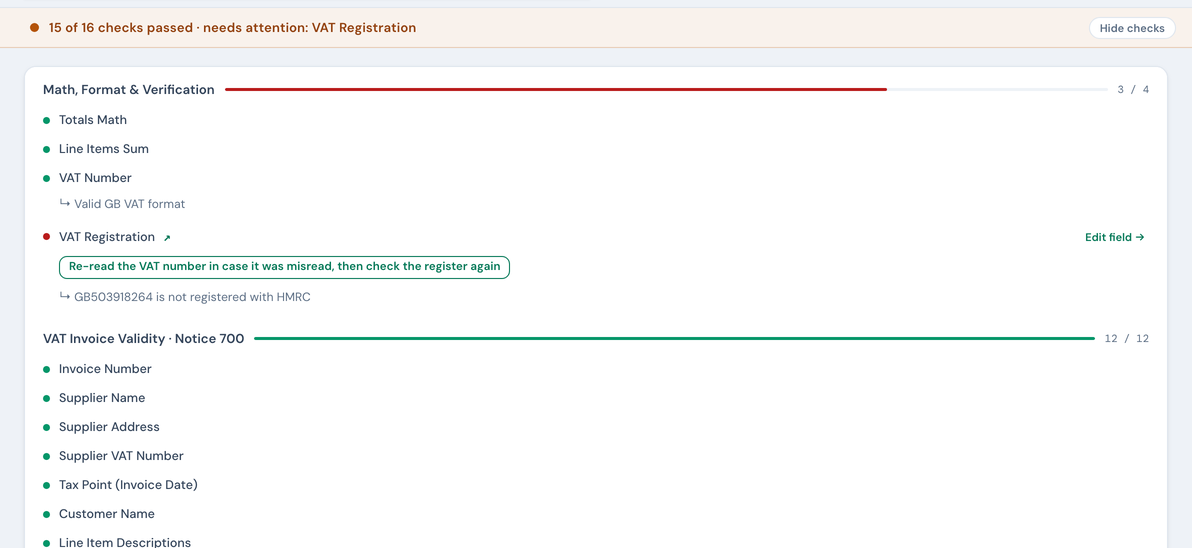
Every extraction gets a compliance verdict (labelled VAT Guardian on screen) in the band at the top of the record: how many of NoticeDesk's compliance checks the document passed and, when something failed, which checks. Show checks at the right of that band opens the full list underneath; the record stays in view until you ask for it. In History the same list has its own header and dial and opens by itself when a check fails. A field whose check failed or warned carries the word needs attention ⚠ under its value (a passing field carries nothing at all), and the AI Companion feed summarises the run in one line. The checks come in two groups:
- Arithmetic & verification: does the maths reconcile, is the VAT number well-formed, and is the supplier actually VAT-registered.
- Notice 700 particulars: the details HMRC's VAT guide expects to see on a full VAT invoice: invoice number, tax point, supplier VAT number, per-line description, quantity and price, the VAT stated, and so on. Twelve presence checks in all. A value that is only spaces counts as missing, and a shipped quantity counts as the line's quantity as much as an ordered one does. The tax point has one extra state: a date that is present but cannot be read as a date (for example “Q1 2026”) warns with “Date could not be read as a date”. That warning counts as a defect (the evidence pack reads “Defects to review” and a batch counts the document among the flagged), and until the date reads as a date the invoice sits in no VAT period, where it is counted as undated.
Lines that show an amount only. A line with an amount but neither a unit price nor a quantity (a lump-sum service, say) is not failed for either. HMRC accepts an amount alone for a supply that can't be counted (Notice 700 §16.3.2), so the unit price and quantity rows are skipped with that note and read “amount only”. A line that shows a quantity but no unit price still fails, and its row quotes HMRC's caveat: a unit price may not need to be shown if it is not normally provided in the business sector or required by the customer.
Ordinary invoices carry 16 checks; credit notes and receipts each carry a 17th (more below). A receipt is judged against the simplified-invoice rules, so five of the 16 may not apply to it: see receipts and simplified VAT invoices.
Reading the four statuses
| Status | Means | What to do |
|---|---|---|
| Pass | The check is satisfied | Nothing |
| Warn | Worth a look, not necessarily wrong | Check the detail. Example: totals that don't quite reconcile often turn out to be a delivery charge the invoice shows outside the line items. |
| Fail | Something Notice 700 expects is missing or wrong | Fix the field if it was misread, or chase the supplier if the document genuinely lacks it |
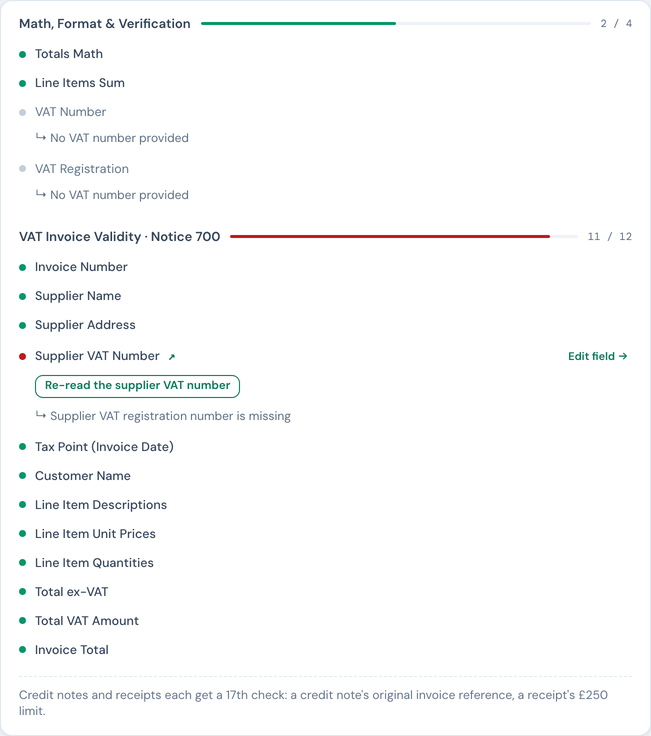
| Skipped | The check couldn't run, or doesn't apply | Read the message: it says why (no VAT number to check, registry unavailable, non-EU supplier…) |
Two kinds of skipped row are not gaps, and the band counts them apart from the rest: not required (a receipt row that the simplified-invoice rules do not ask for) and amount only (a line that shows an amount but no unit price or quantity, which HMRC accepts, as above). A band that reads “14 of 16 checks passed · 2 amount only” counts as clean, and History shows no warning pill for it. If the document does print a unit price or quantity the read missed, re-read the line to put it on the record. Any other skipped row reads “not run”: the check could not run (the register did not answer, HMRC lookups are not switched on yet, a number the register cannot look up), and it is shown as not run, not flagged. No skipped row puts a warning pill on the record in History or counts as “to check” in a batch; only a failed or warned check does.
The arithmetic & verification checks
- Totals Math: net + VAT against the invoice total, to within 5p. An unexplained difference warns rather than fails, because freight and rounding are common innocent explanations. When the totals differ and the document shows no VAT amount at all, the warning says so rather than suggesting a delivery charge: “No VAT amount is printed, and the net and the total differ by 63.80”. A VAT figure that cannot be read as a figure (a comma used as a decimal point, for instance) is never treated as zero: the row reads Skipped with “VAT amount could not be read as a figure” until the box holds a plain amount.
- Line items sum: the line totals against the subtotal, same tolerance. On a receipt whose prices include VAT the lines add up to the total instead, and that passes. A line total that cannot be read as a figure is named (“Line 2 total could not be read as a figure”) and the row Warns, never summing it as zero: the figure needs fixing, so History flags the record until it reads as an amount. The caption beside Line items says which: “do not sum to subtotal”, “do not sum to the total” on a receipt whose prices include VAT, “a line total can’t be read”, or, when there is nothing to add up, “line totals missing” or “subtotal missing”. A record saved by an earlier version of NoticeDesk shows that row as Skipped, and History flags it all the same.
- VAT number format: the supplier's VAT number against the country's official pattern (every EU member state plus GB and XI covered). A number under a country code we hold no pattern for is reported as “could not be checked” rather than passed; the check never manufactures a verdict it cannot support.
- VAT registration: the number is looked up on the official register itself: VIES for EU numbers, HMRC for GB (a lookup that can't be completed reports as unverified, with a plain reason such as the register not answering in time, and a ↻ Retry button where trying again can help). A pass tells you the number is registered and to whom; the result records when the check ran and which register answered, and that evidence is kept with the extraction. Where the invoice shows a trading name and the register the registered company (a till receipt from a supermarket branch, say), the row still passes and reads "trading name differs" beside the registered name, so the difference is stated rather than hidden. Where the invoice and the register spell the name in different alphabets (a Greek supplier, whose name the EU register gives in Greek letters, invoicing in Latin letters, say), the row passes and says the supplier name "could not be compared" with the registered name because the two are written in different alphabets: the number is registered, and nothing is claimed about the name. The same holds the other way round: when the register spells the name in Latin letters and the invoice in Greek or Cyrillic letters, the check says the names could not be compared. The exception is look-alike letters: the check sets aside legal forms such as Ltd or A.E., in any alphabet and even when one is written straight on to the end of the name, and judges the words that name the business, reading short pieces of a name (A.C.M.E., say) together; if one of those words is written entirely in letters that look like Latin ones (a Cyrillic A, C, E or M, or a Greek A, E or M, say), the row warns. A single word of one or two letters, and the Greek words for of the in a sole trader's name, are not judged on their own. A name written that way is flagged even when it is genuine, so check the spelling the register gives before paying. The row also passes as not compared, and says why, where neither name has a distinctive word to compare (only a legal form, or a couple of letters). For two names in Greek or Bulgarian letters: a name whose words are all inside the other's (a short trading title inside the longer registered name, say) is matched, as is one that differs only in its legal form (A.E. against the words spelled out, say) or in the order of its words; a name that shares only part of a word with the other, or only its first word, is not compared; and two names that each have words the other lacks warn.
Change the VAT number or the supplier name, by hand or with a ✦ re-read from the document, and NoticeDesk re-checks the new pair against the register automatically: the row shows "Checking with HMRC/VIES…" and updates with the register's answer a moment later, or reports unverified where the lookup can't be completed. The old number's result is never carried over. The register's answer is kept with the record: save your edit and the fresh result is saved with it, and a re-check of an already-saved number (the ↻ Retry button, or the fix chip in the AI Companion drawer) updates the record straight away, so History, the VAT Invoice Check and the evidence pack show the same verdict as the screen. A re-check draws on the same credits as extraction: with none left, the row reads "out of credits" instead of offering a retry, and the usual out-of-credits notice appears above the record. Buy a top-up pack or change plan, then enter the VAT number again to check it. Each workspace can make 300 re-checks a day that ask the register itself; past that the row says so until midnight UTC. A re-check NoticeDesk can answer from a recent lookup of the same number does not count and still works, which covers the re-check after a supplier-name edit. If your last payment didn't go through, the row says so instead: an owner or admin updates the card under Manage billing first, since no pack or plan change can be bought until then.
Fixing a failed check
Most warn or fail rows carry two buttons; the three amount-stated rows (Total ex-VAT, Total VAT Amount, Invoice Total) offer Edit field → only. The re-read button is labelled with what it reads, for example Re-read the VAT number or Re-read the invoice date: it sends your document back and that one value is read again exactly as printed; nothing else in the record can change, and the check runs again on what comes back. For the arithmetic checks (Re-read the totals, Re-read the line totals) it re-reads the printed figures and, if they still don't add up, tells you the document itself doesn't reconcile rather than altering a number. Edit field → jumps you to the field so you can type the value yourself. Either way the checks recompute instantly. The same suggested fixes are gathered in the AI Companion drawer, opened from the top bar; see fixing extractions. Most flagged rows also cite the HMRC rule involved, with a ↗ link to the gov.uk source, so you can read exactly what the expectation is (the one exception is Line Items Sum: pure arithmetic, with no HMRC rule to point at).
Credit notes: the 17th check
When the document is a credit note, one extra check runs: does it state which original invoice it corrects? HMRC expects a credit note to reference the invoice it amends (Notice 700 §18.2.3). If your history contains that invoice, NoticeDesk links the two.
Receipts: the other 17th check
A till or card-terminal receipt is judged against the simplified VAT invoice rules instead (Notice 700 §16.6, for retail supplies up to £250 including VAT). Five of the twelve particulars above are not required on one (customer name, per-line unit price and quantity, the ex-VAT subtotal and the separate VAT amount), so on a receipt those rows read Skipped when the document leaves them out, never Fail. On a sterling receipt of £250 or less they also read “not required” and count as clean (the VAT amount row only when a line shows its VAT rate, which a simplified invoice must). In their place one receipt-only check compares the total with the £250 limit. The full story, including what a receipt must still show, is in receipts and simplified VAT invoices.
Non-UK invoices will flag, and that's deliberate
NoticeDesk runs its UK checks on every document. A US invoice (or any supplier outside the VAT system) will fail the VAT-number presence check and skip the format check, because it isn't a UK VAT invoice, and it wouldn't support a UK VAT claim as-is. The red row is the product telling you that, not a bug.
What the results are, and aren't
NoticeDesk runs its compliance checks on each document and shows its evidence: the rule, the arithmetic, the register response. It does not provide tax advice, and a passing document is not a determination of how HMRC will treat any claim.
Need the evidence outside NoticeDesk? Open any extraction in History and download its Evidence record: a CSV of every check and its result for that document, with the gov.uk citation where the check has one.