How credit notes are handled
Detected at extraction, checked for their original-invoice reference, and exported with the right money direction for each accounts package.
Last updated 9 October 2026 · 2 min read
Spotted at extraction
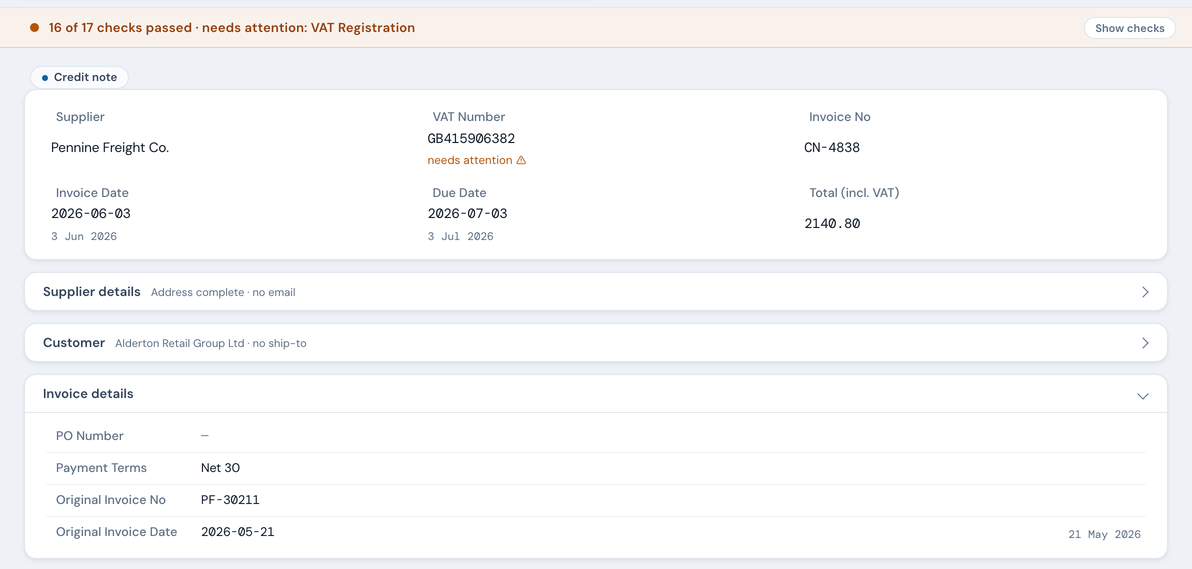
When a document is a credit note, NoticeDesk recognises it during extraction: the row gets a Credit note pill, and two extra fields appear inside the Invoice details card: Original Invoice No and Original Invoice Date, the reference back to the invoice being corrected.
The 17th check
Credit notes carry one compliance check invoices don't: Original Invoice Reference. HMRC expects a credit note to state which invoice it amends (VAT Notice 700 §18.2.3), so the check verifies the reference is present; if the original invoice is in your History, NoticeDesk links the two documents together.

Amounts: what you see vs what exports carry
On screen, a credit note shows its amounts as printed on the document (positive), matching what you'd read holding the paper. If the credit note prints them with a minus sign, NoticeDesk records them as positive when it reads the document, and again when you re-read its subtotal, VAT or total; the timeline and the Evidence record name which figures. Save asks for those three figures as positive numbers. The money direction is applied where it matters:
| Surface | How the credit shows |
|---|---|
| Extract / History view | As printed on the document |
| VAT Invoice Check | VAT subtracted from the period, with an explicit "reducing period VAT by £X" line |
| Sage 50 export | Type=PC (purchase credit) with positive amounts, Sage's own convention |
| Xero export | Negative line amounts: how Xero's bill importer represents credits |
| QuickBooks® export | Left out of the file: QuickBooks Online's bill import cannot take supplier credits, so you are told how many are being left out and enter them in QuickBooks by hand |
| FreeAgent export | Negative amounts on every money column (FreeAgent's own convention for a bill credit note), with the original invoice named in the comments column. (A bill-ready sheet for keying in or for FreeAgent's API: FreeAgent has no bill CSV importer) |
| Finance-Ready CSV | As printed: positive amounts, exactly as the document shows them, with Document Type reading “Credit Note” and Original Invoice No naming the invoice it corrects, so a combined file can still be totalled correctly |
A guard you'll never notice (on purpose)
The document type is pinned: neither an AI fix nor a direct edit can turn an invoice into a credit note or back again, because that would flip the money direction of your exports. It is decided once, at extraction, and saved with the record. If the type itself was read wrongly, tell us at [email protected]; it can't be changed from the screen.
Finding them later
In History, credit-note rows carry the same pill, and the Credit notes filter chip shows only them. The Total at the top of History subtracts credit notes: an invoice for £100 and a credit note for £40 read £60.00, and the Credit notes chip on its own reads a negative total. In the VAT Invoice Check, a period containing credit notes says so explicitly rather than quietly changing the totals.