Exporting to Sage 50
Turn an extraction into a purchase-invoice CSV that Sage 50 imports directly, with nominal codes, tax codes and supplier references included.
Last updated 9 October 2026 · 7 min read
What you get
A CSV of purchase invoice (PI) transactions in Sage 50's 9-column import shape: one row per invoice line, dates as DD/MM/YYYY, and each line's VAT worked out from its own rate where the invoice states them, and apportioned across the lines in proportion to their value where it does not. It's built for Sage 50's transaction import, not for retyping. Either way the VAT column never adds up to more than the VAT the invoice itself states. Where the lines add up to the invoice's net, or to more than it (a discount printed only in the totals), the column adds up to exactly that figure, however many lines it has; where they add up to less (a line that was not read), each line keeps its share, and the dialog says what the file posts before you download. Where rounding each line leaves a penny or two over, those pennies are spread one to a line across the lines that carry VAT, never added to a zero-rated one, and never more than a penny moved from any single line.
Export from an extraction
-
Open the export menu
With an extraction on screen (or open from History), press Export ▾ and choose Sage 50.
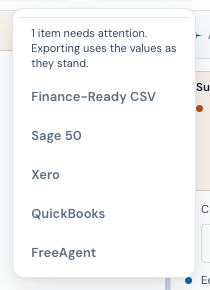
The Export menu in the top bar. -
Choose the nominal code
Pick where this spend should post. The list carries Sage’s own default nominal names (5000 Materials Purchased, 5001 Materials Imported, 6201 Advertising, 7400 Travelling, 7500 Printing, 7600 Legal Fees, 7800 Repairs and Renewals), or choose Other… and type your own code. Check them against your own chart of accounts: Sage validates that a nominal exists, not that it matches the name we showed, so a code that is right in the default chart and re-used in yours will import cleanly into the wrong place.
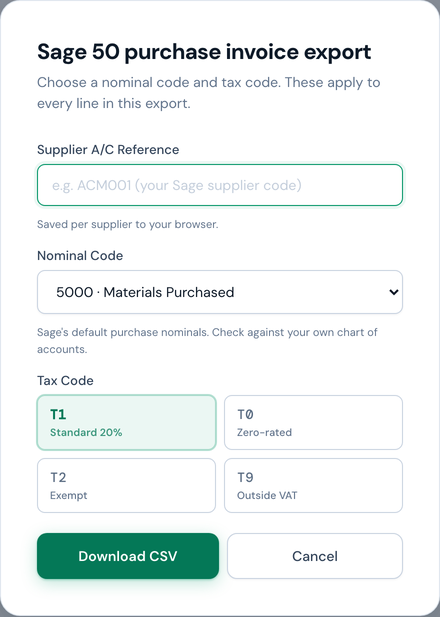
Everything Sage needs, collected once: A/C reference, nominal code, tax code. -
Choose the tax code
Code Use for T1 Standard-rated UK purchases (the usual case) T0 Zero-rated purchases T2 Exempt purchases: insurance, postage, finance. Not the same as zero-rated or outside the scope T9 Outside the scope of VAT; pre-selected for you when every invoice in the export is in a currency other than sterling. Any tax an invoice shows is added to the cost of its lines, with no VAT posted. An export that includes a sterling invoice opens on T1, so check it before you download -
Confirm the supplier reference
The A/C field is the supplier's account reference in your Sage company. NoticeDesk remembers the reference you use for each supplier and pre-fills it next time; for a supplier it hasn't seen, the field is left for you rather than guessed.
-
Download, then import into Sage 50
Before you download, the dialog may show an amber note about the tax code. It appears when the invoice and the selected code disagree: an invoice showing no VAT under a standard-rated code, a sterling invoice carrying VAT under T9 (which keeps it off your return) or under T0 or T2 (which say none was charged), lines at different VAT rates when one code will be applied to all of them, a line whose printed VAT rate could not be read (a rate written as Exempt, E, Z or Out of scope, or a line coded T0, T2 or T9, is read as zero; Std, S or T1 is not, because that names a rate rather than stating it), a VAT figure that could not be read as a number, or a till receipt whose line amounts add up to neither its total nor its total less VAT. It also names a foreign-currency invoice that shows tax (a US sales tax included): under T9 it says the file adds that tax to the cost of the lines, under T0 or T2 that the code posts it as VAT, and under T1 that the code reclaims tax charged abroad as UK VAT. Under its no-UK-VAT, zero-rated and exempt choices it says the tax may be UK VAT you can reclaim when the supplier's VAT number starts GB, XI or UK or its country is the UK, and asks when the number has no country prefix; under one that charges VAT (which already reclaims it) it asks only about a number with no country prefix; suggests the reverse charge may apply to a foreign invoice that shows no tax, says what the file posts when the lines add up to more or less than the invoice's net, may say what the file posts against the invoice's printed total, where the two differ by more than 5p and no other sentence already says what the file posts (a net read before a discount, say), names a line with a unit price but no amount (the file posts nothing for the line's own amount; where no line on the invoice shows an amount, the VAT it prints still goes in, under T9 as part of the cost), names a credit note line whose VAT runs against its own amount (Sage rows carry sizes, so that sign is lost), and names an invoice date that could not be read as a date (Sage may refuse the import, and a Sage import is all-or-nothing, so correct the date and save first; a saved record reopens for editing when you upload the same file again). It never changes the code for you: it names what it noticed and leaves the choice with you, because zero VAT can mean zero-rated, exempt or outside the scope, and only the document tells you which.
A nominal code is required: leaving Other… empty shows an inline message and the download waits rather than producing a file Sage would reject. The message clears as soon as you type a code.
In Sage 50: File → Import → transaction import, and point it at the CSV. On your first import, map the columns using the wizard's drop-downs and check the preview. Accept the backup the wizard offers, every time. Sage's own documentation says imported transactions post straight to the audit trail with no draft state, and that the import is all-or-nothing: one bad row rejects the whole file. The backup is your way back.
Credit notes
A credit note exports as Type PC (purchase credit) with positive amounts. That's Sage's own convention: the transaction type carries the direction, not a minus sign. A line that runs the other way, such as a restocking fee on returned goods, is written as a PI row with positive amounts, so the rows still add up to the credit and no PC row carries a minus sign. Import it like any other row and Sage posts it as a credit.
Exporting a whole batch
From a batch summary or a History batch group, the same export produces one combined CSV for every invoice in the run. The nominal and tax-code prompt appears first, exactly as it does for a single invoice; the codes you choose apply to every row in the combined file, and each supplier’s remembered A/C reference still fills its own rows. A supplier you have never given an A/C reference to exports with that column blank, and a blank reference can reject the file. The reference field is disabled on a combined export (it is filled per supplier from what you entered on that supplier's own single-invoice export), and the note beneath it tells you which suppliers in the run have no saved reference yet. To give one supplier a reference, open one of its invoices from History and export it on its own; the reference you enter there is remembered. Note that Export from a row you have drilled into inside a batch still covers the whole run, and the dialog says how many invoices it will include.
Where the supplier printed a product code, it rides at the end of the Details text, as in Steel bracket, 90mm (SB-90), so you can match a line back to a purchase order or delivery note. Sage 50’s import has no separate item-code field, so the description is where it belongs.
If any invoice in the export isn’t in GBP, a currency check appears before the prompt: Sage 50’s import has no currency field, so foreign amounts would post as base-currency values. You can go back or export anyway; nothing is ever locked.
Review the extracted data first: the amber and red markers tell you where to look. You're responsible for what's posted into your accounts; NoticeDesk makes the checking fast, it doesn't replace it.