When a document defeats extraction
The rare fallback: one click to try again, with the raw read beside your document if you'd rather fix it by hand.
Last updated 9 October 2026 · 8 min read
What triggers it
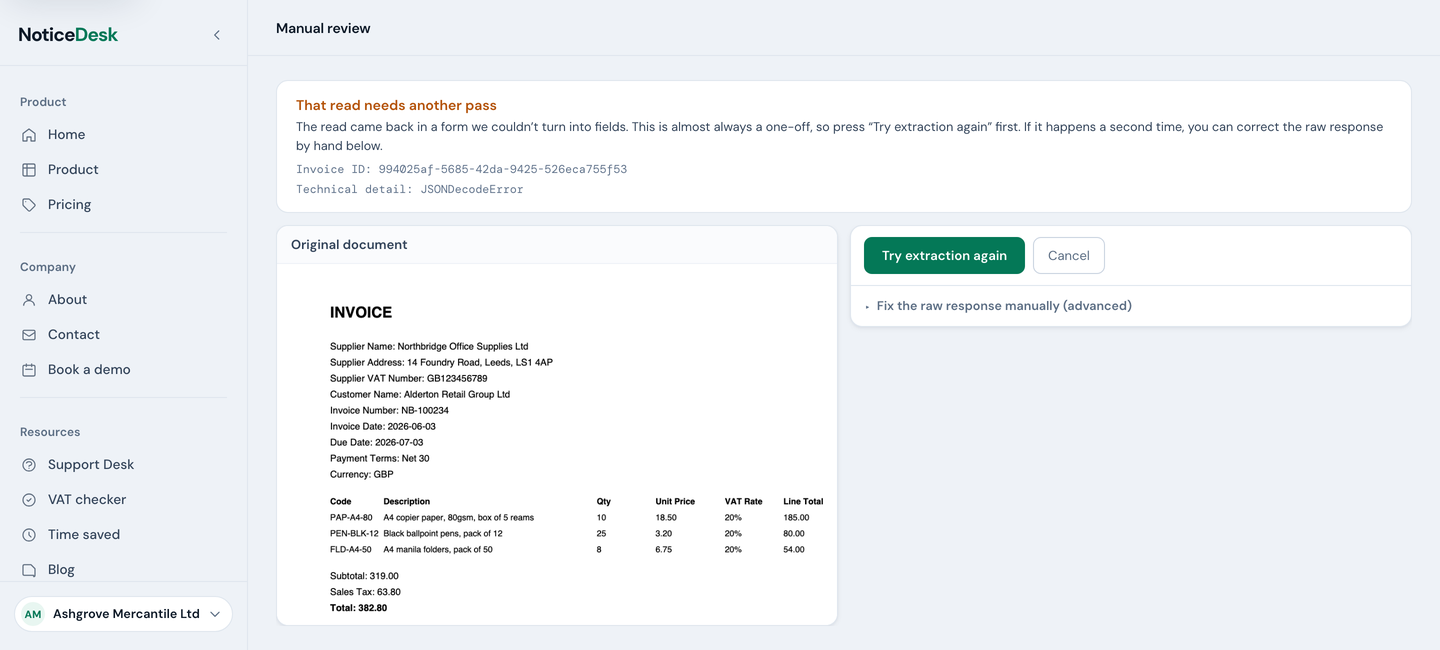
Very occasionally (a heavily degraded scan, an unusual layout, a one-off glitch) the read can't be turned into clean structured data, even after NoticeDesk has quietly retried it once for you. Rather than guess, NoticeDesk opens manual review: the original document on the left, a one-click Try extraction again on the right, and the raw read (the text that came back, before NoticeDesk turns it into fields) tucked underneath for hand-fixing if the retry doesn't take. One cause a retry cannot fix: a subtotal, VAT or total read with more than two decimal places, or with more than ten digits before the decimal point, which NoticeDesk cannot store. The read lands here every time, so correct that figure to pounds and pence in the raw response.
Fix it and keep it
-
Try again first
Press Try extraction again. Most failures here are one-off glitches in the read, not problems with your document: a retry usually comes back clean and drops you straight into the normal Extract view.
One exception: if the banner is headed This read was declined, the document was turned away for reading rather than garbled, and trying again usually gives the same answer. Check it is the invoice or receipt you meant to upload; if it is, type the record by hand in the raw response.
-
Or correct the response by hand
If the retry lands back here, open Fix the raw response manually (advanced) and edit the response directly, checking against the document beside it: fix the misread supplier name, mend the invoice number, straighten the dates. Whether a field may be left blank depends on the response as it came back. If NoticeDesk could read it and finds some of the three fields in it, a field the response shows as empty may stay empty (a till receipt that prints no number, for instance), one it filled in may not be emptied, and the ones it does not mention at all are needed. Otherwise (NoticeDesk could not read the response, or found none of the three fields in it), a record saved here needs an invoice number, a supplier name and at least one line item. For a document that prints no number, no supplier name or no line items, use Try extraction again, which reads it as printed.
-
Parse & continue
Press Parse & continue: NoticeDesk turns your corrected text back into fields. Your corrected data flows into the normal Extract view, compliance checks and all, and is kept in History like any other extraction, marked as manually recovered on its timeline. The filing takes a moment. On a single upload, leaving during that moment asks you first, because the record exists nowhere else until it is filed. In a batch you can open another file's chip straight away: the filed row updates in place with a short note naming it, and a field you edit while it files stays yours to save.
-
If it says "Not saved to History yet"
The corrected record is on screen but has not been filed, and the notice says why. Out of credits: the usual out-of-credits notice appears at the top of the screen with the way forward (a top-up pack, or a plan change; if the workspace's last payment didn't go through, an owner or admin updates the card first, as How credits work explains), and Retry save files the record once credits are back. While that record is unfiled, See plans and Upgrade plan open in a new tab so the record stays where it is; come back to this tab and press Retry save. A field the record cannot be saved without (the notice names it, for example the currency code): correct it in the record below, then press Retry save; the retry always sends what the record shows at that moment, edits and undos included. If the failed upload is no longer on the server, the notice says so and asks you to upload the document again, and there is no Retry save for it. If saving failed on our side in a way another try would repeat, the notice says so and there is no Retry save either: export or copy what you need from the record, then upload the document again for a fresh read; nothing was charged for the attempt. Only a lost connection asks you to check your connection. Until it is saved, the record is lost if you leave the page or refresh, so leaving asks you first, whichever way you leave. In a batch the file chips and Back to batch sit above the recovered record as they do for any other file, and the notice belongs to its file: open another file's chip and it goes with the file, open that file again and it is back with its Retry save. A save that finishes after you have moved to another file never touches the file now on screen: a filed row updates in place and a note names it; a refused one is reported and waits on its own row with Retry save.
-
If the notice names a value it can't save
The corrected record is on screen but has not been filed. When NoticeDesk refused it over a value it cannot save, a notice says which one in the server's own words, for example Sales Tax could not be read as a figure. Type a plain amount such as 120.00. Correct that value in the record below, then press Retry save; the retry sends the record as it now stands. Only a lost connection asks you to check your connection. Until it is saved, the record is lost if you leave the page or refresh.
When the read worked but saving it did not
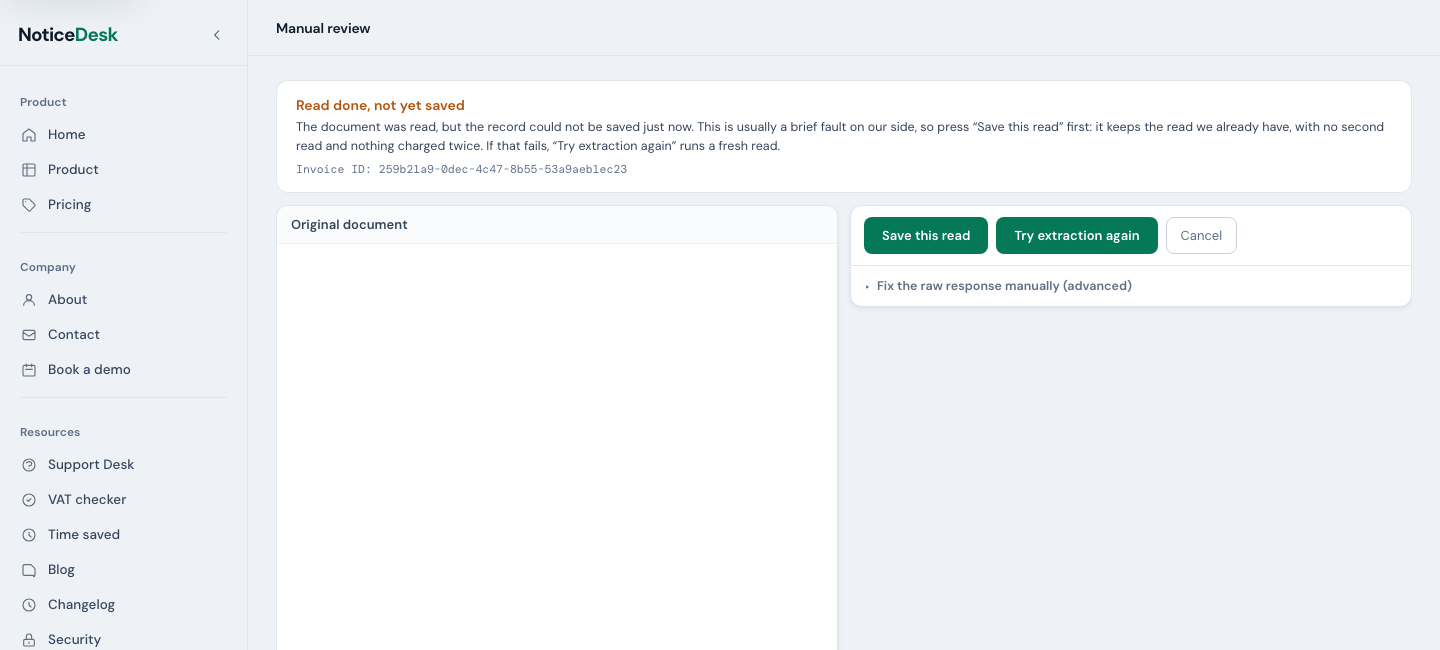
Very rarely the document reads fine and the record then fails to save (a fault on our side, not in your file). The same screen opens, headed Read done, not yet saved, with a different first button: Save this read. Press it and NoticeDesk keeps the read it already has, exactly as it came back, even when the document has no invoice number, no supplier name or no line items (a till receipt, for instance). Nothing is read a second time and nothing is charged twice; the record lands in History like any other. Try extraction again stays beside it as the fallback if saving fails a second time.
Four things can happen after you press it, and the screen tells you which:
- A brief fault repeats. A lost connection, or a moment when the service is busy: a Not saved to History yet notice appears above the record with a Retry save button. Nothing on screen is lost; retry when you're ready. A retry answers in the same ways as the first press: it either saves the record, or brings you back to this screen as the next three points describe. It never says a record was saved when it was not.
- Saving would fail the same way again. When the fault on our side is one that saving the same read would only repeat, you're brought back to this screen with the raw response open and a message saying so, and there is no Retry save. The screen now leads with Try extraction again: press it to read the document again; the attempt that did not save is not charged. Save this read comes back, after it, only once you change a value in the response, and saves your corrected version; so does Parse & continue under the response, which would otherwise save the same read the same way. A change of spacing or line breaks alone is the same read, so it brings neither back.
- The read can't be saved from here. Rarer still: the same fault also stopped NoticeDesk keeping the read for later, so there is nothing to save it against. You're brought back to this screen with Save this read gone and a message saying so. Press Try extraction again; the attempt that did not save is not charged. When NoticeDesk knows this at the outset, the screen opens in that shape straight away.
- The record itself is turned away. If the read holds something NoticeDesk can't store (a date it can't make sense of, say), you're brought back to this screen with the raw response open for correction and the reason shown. Fix the named field, then save it again.
Manual review is rare by design: the extraction pipeline self-heals most messy responses before you ever see them. If a particular supplier's documents keep landing here, email us a sample and we'll look at it.