Cancelling your plan & refunds
Cancel in two clicks, keep access to the end of the period you've paid for, and how refunds and account deletion work.
Last updated 9 October 2026 · 4 min read
Cancel your plan
Cancelling is self-serve and takes two clicks from the app. No email needed.
-
Open Plan & billing → Manage billing
Pick Plan & billing in the sidebar, then Manage billing. This opens your secure billing portal (run by Paddle, our payment provider; the same place your VAT invoices live).
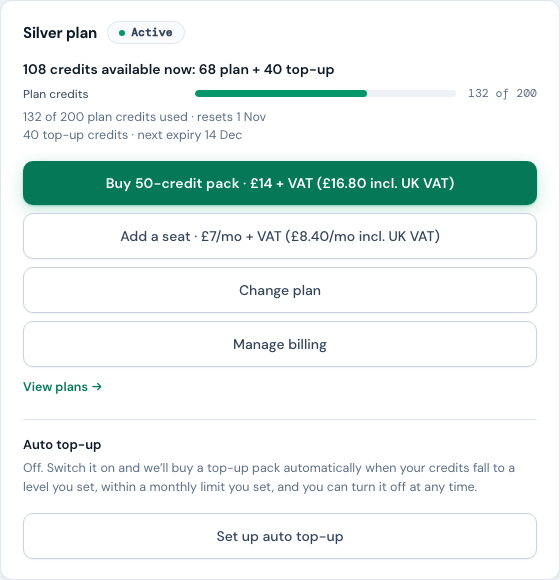
Manage billing sits on your Plan & billing card; cancellation lives behind it, in the billing portal. Very occasionally the button answers "NoticeDesk is busy right now. Try again in a few seconds." That is the service briefly at capacity: nothing about your plan has changed. Wait a few seconds and press it again; if it keeps happening, email [email protected] and we will cancel it for you.
-
Choose Cancel subscription
Confirm, and it's done. You'll get an email confirming the cancellation.
What happens after you cancel
- You keep everything until the period you've paid for ends: credits, features, seats. Nothing stops early. Your last day counts in that period, so a plan that is set to end doesn't start a fresh set of credits on its final day.
- A plan set to end can't be changed. While the cancellation is scheduled, the plan can't be moved up or down and seats can't be added, because anything bought then would end with the plan. Keep your plan first if you'd like to do either.
- No further charges. The subscription doesn't renew.
- Your data stays yours. After the plan ends, you can still sign in, read your full History and compliance results, and download exports. Only the paid features pause: batch runs, the VAT Invoice Check and the approval workflow, and new extractions (uploaded or emailed in) once any top-up credits you bought have been used or have expired.
- Come back any time: re-subscribe and you pick up where you left off.
Changed your mind? Keep your plan
Until the cancellation takes effect, an owner or admin can undo it from NoticeDesk itself: Plan & billing → Keep my plan. The billing portal can't undo a cancellation, so this is the one place to do it.
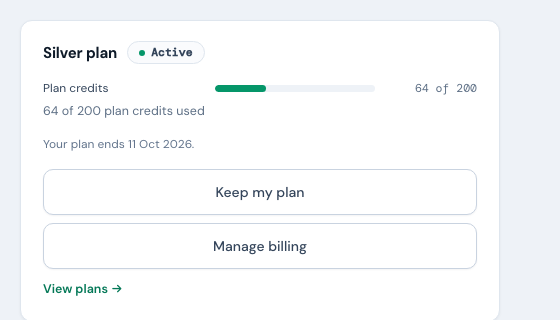
Before anything changes, NoticeDesk asks you to confirm and says what keeping the plan means for your card: "Your plan renews on 11 Oct 2026 at £63 a month (£75.60 with UK VAT), extra seats included." If a move down is scheduled, the price shown is the lower plan's. During a free trial it names your first payment instead: "Your trial ends on 4 Oct 2026 and your first payment of £58.80 (with UK VAT) is then taken." Nothing is charged when you confirm; the plan simply renews as it would have. The note that your plan ends goes within a minute or so, once our payment provider confirms the change. If two-factor is set up on your account, you'll be asked for a code first. The button isn't offered while a payment is outstanding (update your card first), and it can't be used in the half hour before the cancellation takes effect.
During the free trial
Some plans start with a free trial (the pricing page says which and for how long). Cancel before the trial ends and you're never charged; the steps above work exactly the same during a trial. A plan without a trial bills at checkout, and your first payment is covered by the 14-day refund window below instead.
Refunds
In plain English:
- Changed your mind? 14 days, any purchase. Ask within 14 days of being charged and we'll arrange a full refund: your first payment, a renewal, a top-up pack or an extra seat alike. You don't need to give a reason.
- What a refund does: a refund ends the access it paid for. If we refund a subscription payment we cancel the subscription at the same time, so you aren't billed again and the paid features stop. If we refund a top-up pack, any credits still unused from it stop being available. If we refund the charge for moving up a plan, your subscription carries on and returns to your previous plan at your next renewal. If we refund an Extra Seat, we remove that seat from your subscription before your next renewal, so it is not billed again. (Separately, top-up credits stay usable for 90 days if you don't use them straight away.)
- Fair use: the window is for genuine changes of mind. In line with Paddle's own refund policy, refunds aren't issued where there's evidence of fraud, refund abuse or other manipulative behaviour. Your statutory rights are unaffected.
- Something genuinely went wrong on our side? That's different: email us and we'll put it right.
This is a plain-English summary: the full Refund & Cancellation Policy is the authoritative version and sets out your statutory rights. To request a refund, either ask Paddle directly at paddle.net using the email address you bought with, or email [email protected] from your account email with the invoice or receipt number. Refunds are processed through Paddle back to your original payment method.
Deleting your account and data
Email [email protected] from your account's email address and we'll delete your account and its data. The only exception is records we must keep by law, such as security and audit logs (up to 7 years). Cancel any live plan first so nothing renews. The Privacy Notice sets out the full detail and your rights.
Changing plan instead
If it's the price rather than the product, a smaller plan might fit better. Changing plan happens in NoticeDesk itself: Plan & billing → Change plan (the Change plan button on an out-of-credits notice opens the same picker). Moving down takes effect at your next renewal and you keep your current credits until then; nothing is charged today. Cancelling stays in the Manage billing portal. To remove a seat, email [email protected] and we'll arrange it. Any extra seats you've bought carry across a plan change. See how a plan change works and what each tier includes.