Every invoice run through 16 compliance checks before it reaches your ledger.
Upload the invoice. NoticeDesk reads it, the arithmetic is reconciled to within 5p, the VAT number is verified with HMRC or VIES, and every defect cites the gov.uk rule it broke. Then export to the package you already use.
- Email-code sign in, no passwords
- Your card number never reaches NoticeDesk
- 14-day refund on any purchase
A fictional invoice. Every result on the paper is NoticeDesk's own check, computed in your browser.
Fictional invoice with a made-up VAT number that belongs to no real trader. Nothing you type leaves your browser.
Each HMRC-rule check that fails or warns carries its gov.uk reference, so you can read the rule it was checked against.
Four kinds of check, on every invoice
The fields are read, then checked. Anything that fails or needs a second look is flagged before it reaches your ledger.
The invoice particulars
12 presence checks from VAT Notice 700 on every document.
The sums
Lines against the subtotal, net plus VAT against the total, to within 5p.
The VAT number's format
Each country's own pattern. A prefix with no rule is raised for review, never passed.
The register
HMRC for GB numbers, VIES for the EU. A lookup that can't be completed reports as unverified, never assumed.
Extraction is the easy half
Most tools return the fields and stop. NoticeDesk then checks them, and a figure it was unsure of is re-read from the document in one click.
How the checks work| Layer | Extraction | With checks |
|---|---|---|
| 30+ fields, each flagged where unsure | ✓ | ✓ |
| Line items, quantities, unit prices | ✓ | ✓ |
| Net + VAT reconciled to the total, within 5p | – | ✓ |
| VAT number verified with HMRC or VIES | – | ✓ |
| The gov.uk rule cited on every defect | – | ✓ |
| Whole-period rollup with an audit pack | – | ✓ |
How it works
- 1
Upload or forward
Drop a PDF or image, a whole folder, or forward invoices to your NoticeDesk address.
- 2
Read and checked
30+ fields are read and 16 compliance checks run (a 17th on credit notes and on receipts), again on every edit.
- 3
Export with evidence
Download the file your accounts package takes, with the record of every check behind it.
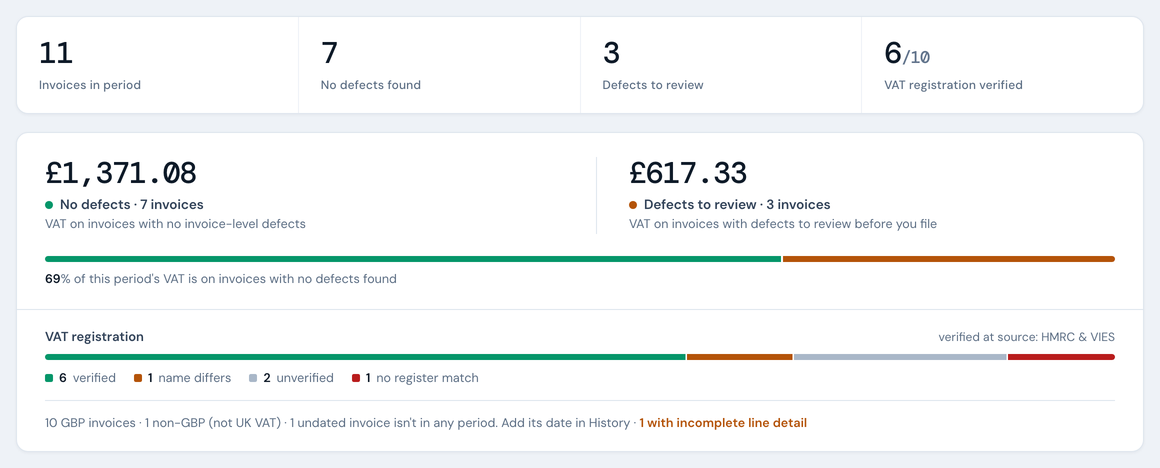
Then the whole VAT period, on one screen
Every stored verdict in a date range, split into invoices with no defects found and invoices with defects to review before you file. Download the audit pack for your working papers.
The VAT Invoice Check is included on Silver plans and above. NoticeDesk doesn't file returns or give tax advice.
Plans from £19 a month
One credit checks one document of up to 10 pages.
Put your next VAT period through it.
16 compliance checks on every invoice, with a 17th on credit notes and on receipts. Every plan includes every check and every export.
Intuit and QuickBooks are trademarks of Intuit Inc., registered in the US and other countries. NoticeDesk is not affiliated with, or approved by, Intuit Inc. FreeAgent is a trademark of FreeAgent Central Ltd; NoticeDesk is not affiliated with or endorsed by FreeAgent.
Batch results
| # | File | Supplier | Invoice # | Total | Status |
|---|
Preview not available
Fix the raw response manually (advanced)
| Invoice date | Supplier | Invoice # | Total | Guardian |
|---|---|---|---|---|
| Loading… | ||||
Your VAT period
Platform overview
Your plan
Loading…
Requests to join
Loading…
Your team
Loading…
Email invoices in
Loading…
Contact & demo enquiries
Loading…
Account security
Loading…